RSS
RSSF distribution
Shape of Distribution
Basic Properties
- Two parameters
and
are required (Positive integer)
- Continuous distribution defined on semi-bounded range
- This distribution is asymmetric.

Probability
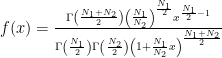
- Probability density function
, where
is gamma function.
- Cumulative distribution function
, where
and
is regularized incomplete beta function.
- How to compute these on Excel.
1 2 3 4 5 6 7 A B Data Description 5 Value for which you want the distribution 4 Value of parameter N1 30 Value of parameter N2 Formula Description (Result) =NTFDIST(A2,A3,A4,TRUE) Cumulative distribution function for the terms above =NTFDIST(A2,A3,A4,FALSE) Probability density function for the terms above - Function reference : NTFDIST

Characteristics
Mean – Where is the “center” of the distribution? (Definition)

Standard Deviation – How wide does the distribution spread? (Definition)
- Variance of the distribution is given as
Standard Deviation is a positive square root of Variance.
- How to compute this on Excel
1 2 3 4 5 A B Data Description 4 Value of parameter N1 30 Value of parameter N2 Formula Description (Result) =NTFSTDEV(A2,A3) Standard deviation of the distribution for the terms above - Function reference : NTFSTDEV

Skewness – Which side is the distribution distorted into? (Definition)

Kurtosis – Sharp or Dull, consequently Fat Tail or Thin Tail (Definition)
- Kurtosis of the distribution is given as
- This distribution can be leptokurtic or platykurtic.
- How to compute this on Excel
1 2 3 4 5 A B Data Description 4 Value of parameter N1 30 Value of parameter N2 Formula Description (Result) =NTFKURT(A2,A3) Kurtosis of the distribution for the terms above - Function reference : NTFKURT
![\frac{12[(N_2-2)^2(N_2-4)+N_1(N_1+N_2-2)(5N_2-22)]}{N_1(N_2-6)(N_2-8)(N_1+N_2-2)}\quad (N_2>8)](http://s0.wp.com/latex.php?latex=%5Cfrac%7B12%5B%28N_2-2%29%5E2%28N_2-4%29%2BN_1%28N_1%2BN_2-2%29%285N_2-22%29%5D%7D%7BN_1%28N_2-6%29%28N_2-8%29%28N_1%2BN_2-2%29%7D%5Cquad+%28N_2%3E8%29&bg=T&fg=000000&s=0 "\frac{12[(N_2-2)^2(N_2-4)+N_1(N_1+N_2-2)(5N_2-22)]}{N_1(N_2-6)(N_2-8)(N_1+N_2-2)}\quad (N_2>8)")
Random Numbers
- How to generate random numbers on Excel.
1 2 3 4 5
A B Data Description 4 Value of parameter N1 30 Value of parameter N2 Formula Description (Result) =NTRANDF(100,A2,A3,0) 100 F deviates based on Mersenne-Twister algorithm for which the parameters above Note The formula in the example must be entered as an array formula. After copying the example to a blank worksheet, select the range A5:A104 starting with the formula cell. Press F2, and then press CTRL+SHIFT+ENTER.
- Function reference : NTRANDF
NtRand Functions
- If you already have parameters of the distribution
Reference
- Wolfram Mathworld – F-Distribution
- Wikipedia – F-distribution
- Statistics Online Computational Resource